Convert PNG to PDF without losing sharpness
Turn screenshots, diagrams, charts and scanned pages saved as PNG into a PDF you can send, print or sign. PNG pictures go into the PDF without being compressed again, so the text in a screenshot stays exactly as sharp as it was.
Turn pictures into a PDF right here
Choose JPG or PNG pictures, put them in order and download one PDF with a picture on each page.
Runs in your browser — your files aren't uploaded.
Up to 20 files, 50 MB each and 100 MB in total. No account needed.
Free plan with no time limit. Pro free for 7 days, no card needed.
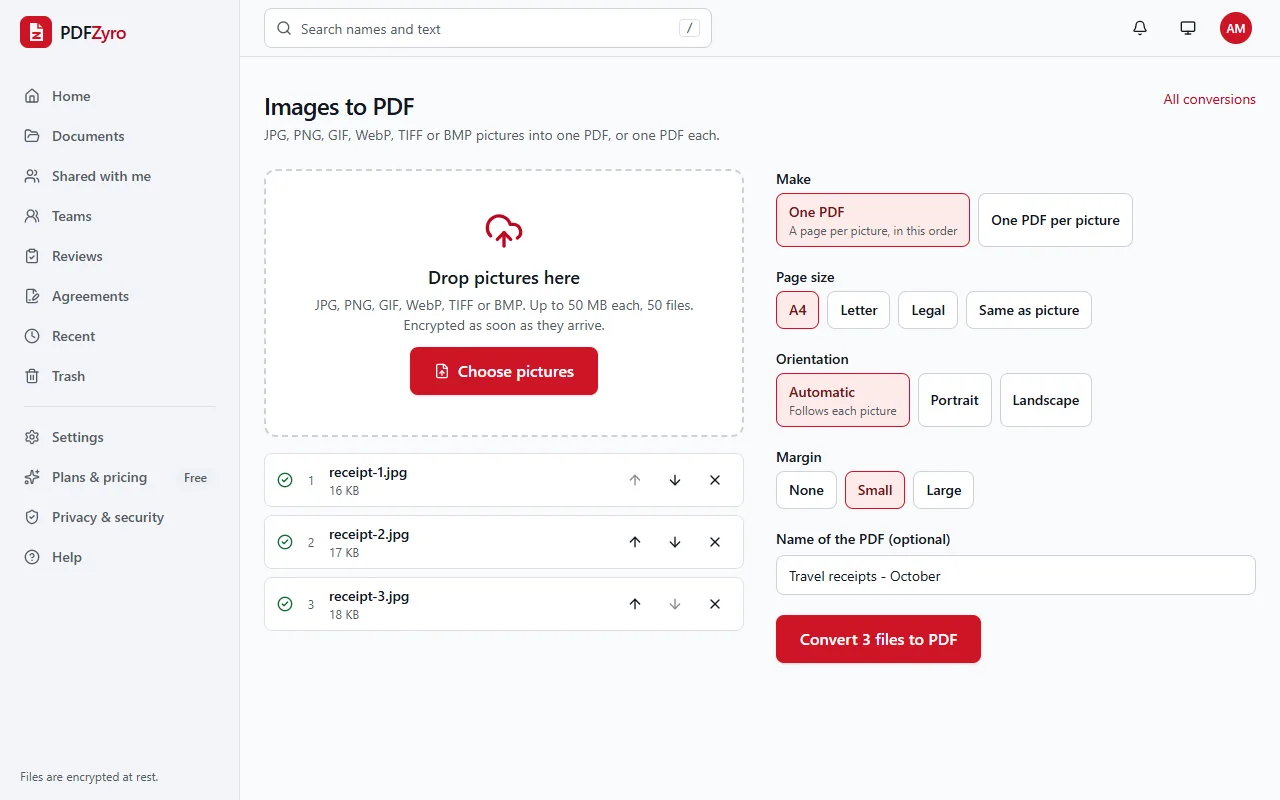
How to convert PNG to PDF
Add your PNG files
Open Images to PDF and choose your .png files, or drag them in. Add up to 50 at once, and mix in JPG, WebP, TIFF, GIF or BMP pictures if you like.
Choose the page
Pick A4, Letter or Legal, or Same as picture for a page the size of the PNG. Choose Same as picture with no margin and a screenshot fills its page edge to edge.
Convert and use it
Click Convert to PDF. The PDF is saved in your library, ready to download, merge with other PDFs or send for signature.
Made for screenshots and graphics
No quality lost
PNG pictures are stored in the PDF without lossy compression, so small text, thin lines and charts stay crisp.
Transparency kept
Transparent areas of a PNG stay transparent in the PDF, so a logo or diagram sits cleanly on the white page.
Small pictures aren't blown up
A picture smaller than the page keeps its size and is centred, instead of being enlarged and blurred. Larger ones are shrunk to fit.
Many PNGs, one PDF
Put up to 50 screenshots in order with the arrows, one page each, or make a separate PDF for each picture.
The right size for screenshots
With Same as picture, the page takes the PNG's own size, using the resolution stored in the file when it has one.
Private by design
Encrypted and private
Every file is encrypted before it's stored, and only you and the people you share with can open it.
Your original stays safe
Every change is saved as a new version. The original is never changed, and you can restore it at any time.
No watermarks
Files you save never get a watermark, on any plan, including the free one.
Works in your browser
Nothing to install. Use it on Windows, Mac, Linux, Chromebooks, iPhone, iPad and Android.
Questions and answers
How do I convert PNG to PDF?
Open Images to PDF in PDFZyro, add your PNG, choose the page size and click Convert to PDF. The PDF is saved to your library, where you can open it or download it.
How do I put several PNG files into one PDF?
Add them all, use the arrows to put them in order and choose One PDF. Each PNG becomes a page, in the order you set. Choose One PDF per picture to get separate files instead.
Will my PNG lose quality in the PDF?
No. The picture's pixels are kept exactly, with no lossy compression, so nothing gets blurrier. If the PDF ends up large, Compress PDF can make it smaller, at some cost to picture quality.
What happens to a transparent background?
It stays transparent: the white of the page shows through, so a logo or chart on a transparent background looks the way it does on a white web page.
Can I make the text in a PNG screenshot searchable?
Yes. A PNG is a picture, so the PDF holds a picture of the text. Run OCR on the PDF afterwards to recognize the words, and you can then search and copy them.
Is PNG to PDF free?
Yes. The Free plan includes 3 edit, convert, compress or OCR tasks a day, with files up to 50 MB, and never adds a watermark. Pro removes the daily limit and is free to try for 7 days, with no card needed.
Related tools
- JPG to PDFTurn pictures into one PDF, or one PDF each.
- PDF to PNGSave each page of a PDF as a sharp PNG picture.
- WebP to PDFTurn WebP pictures saved from websites into a PDF.
- Merge PDFCombine several PDFs into one, in the order you choose.
- Compress PDFMake PDFs smaller to email and share.
Switching from another app? Adobe Acrobat alternative · Foxit PDF Editor alternative · Smallpdf alternative · iLovePDF alternative
From screenshots to a tidy PDF
Create a free account in under a minute. No card needed, and no watermarks on anything you save.
Convert PNG to PDF free