DocuSign vs PandaDoc vs PDFZyro: which should you choose?
The short answer: DocuSign is an electronic signature service for sending and managing agreements, PandaDoc is a document platform for creating proposals, quotes and contracts and getting them signed, and PDFZyro is a PDF app with e-signatures built in. Which one fits depends on how you create your documents and what you need around the signature.
Updated October 15, 2026 · By the PDFZyro team. PDFZyro is our product. DocuSign and PandaDoc are described in one neutral line each, without prices or feature claims, because those change and are best checked on their own websites.
The three at a glance
All three let you send a document and get it signed electronically. They start from different places: managing agreements, creating sales documents, or working with PDFs.
| Product | What it is | Built around |
|---|---|---|
| DocuSign | A widely used electronic signature service for sending documents to be signed and managing agreements. | Signing and managing agreements |
| PandaDoc | A document platform for creating proposals, quotes and contracts and getting them signed. | Creating documents such as proposals and quotes |
| PDFZyro (ours) | A browser-based PDF app to edit, convert, fill and sign PDFs and send them for e-signature. | Working with PDFs and getting them signed |
Features, plans and prices change, so check each product's website before you decide.
Which one fits what you need?
Start from the job, not the product. Find the situation closest to yours:
If you write proposals, quotes or contracts from scratch and want them signed in the same place
A document platform such as PandaDoc is built around creating those documents. PDFZyro isn't: it has no proposal builder, pricing tables or payments, so it fits only if your documents already exist as PDFs or Word files.
If your organization manages a large number of agreements across teams and business systems
An established e-signature service such as DocuSign is widely used for that. List the systems your agreements have to connect to and check each provider's integrations on its own website. PDFZyro doesn't connect to CRM or other business systems.
If you mainly need existing PDFs signed, and you also edit, fill, convert or compare them
This is what PDFZyro is built for: signature requests with an audit trail and a sealed PDF, next to every PDF tool, so you can prepare a document and send it without switching apps.
If you need other people to sign only now and then
Look at how each service handles occasional use and how easy signing is for people who have never used it. Check current plans on each provider's website. PDFZyro's Free plan includes a few signature requests each month, and signers don't need an account.
If you need a particular certified signature, such as a qualified electronic signature in the EU
Confirm that the service supports exactly the standard you need before you choose. PDFZyro seals signed documents with its own certificate and lets you sign with your own Digital ID, but it doesn't offer qualified electronic signatures.
What to check before you choose
Whichever service you look at, check these points against the documents you actually send, and try it with a real document and a colleague as the signer.
- Who signs, and whether signers need to create an account or install anything.
- How your documents are made: written inside the service, or PDFs and Word files you already have.
- What proof you get: a record of consent to sign electronically, an audit trail, a certificate of completion and a sealed final PDF.
- How signers are checked: email only, an access code, or a code sent by text message.
- Signing order, roles such as approvers and copy recipients, reminders and expiry dates.
- Templates for documents you send often, and sending one document to many people at once.
- Integrations with the other systems you use.
- Where your documents are stored, how they are protected and how you delete them.
- How the price changes with more users or documents: check each provider's current pricing page.
If the terms are new to you, see what an audit trail and a certificate of completion are, and what makes an electronic signature valid.
What PDFZyro does for e-signatures
Here is what you get with PDFZyro, so you can hold it against the checklist above:
- Signers open an email link and sign in the browser on a computer, phone or tablet, without an account.
- Each signer agrees to sign electronically (ESIGN/UETA) first, and every step is recorded in a tamper-evident audit trail.
- The final PDF is sealed with a digital signature and comes with a certificate of completion that shows who signed and when.
- Signing order, signers, approvers, copy recipients and in-person signing, with reminders and an expiry date.
- An access code before signers can open the document, or a one-time code by text message on the Business plan.
- Templates (Pro) and bulk send from a spreadsheet (Business).
- Editing, filling, converting, comparing, redacting and merging PDFs in the same app.
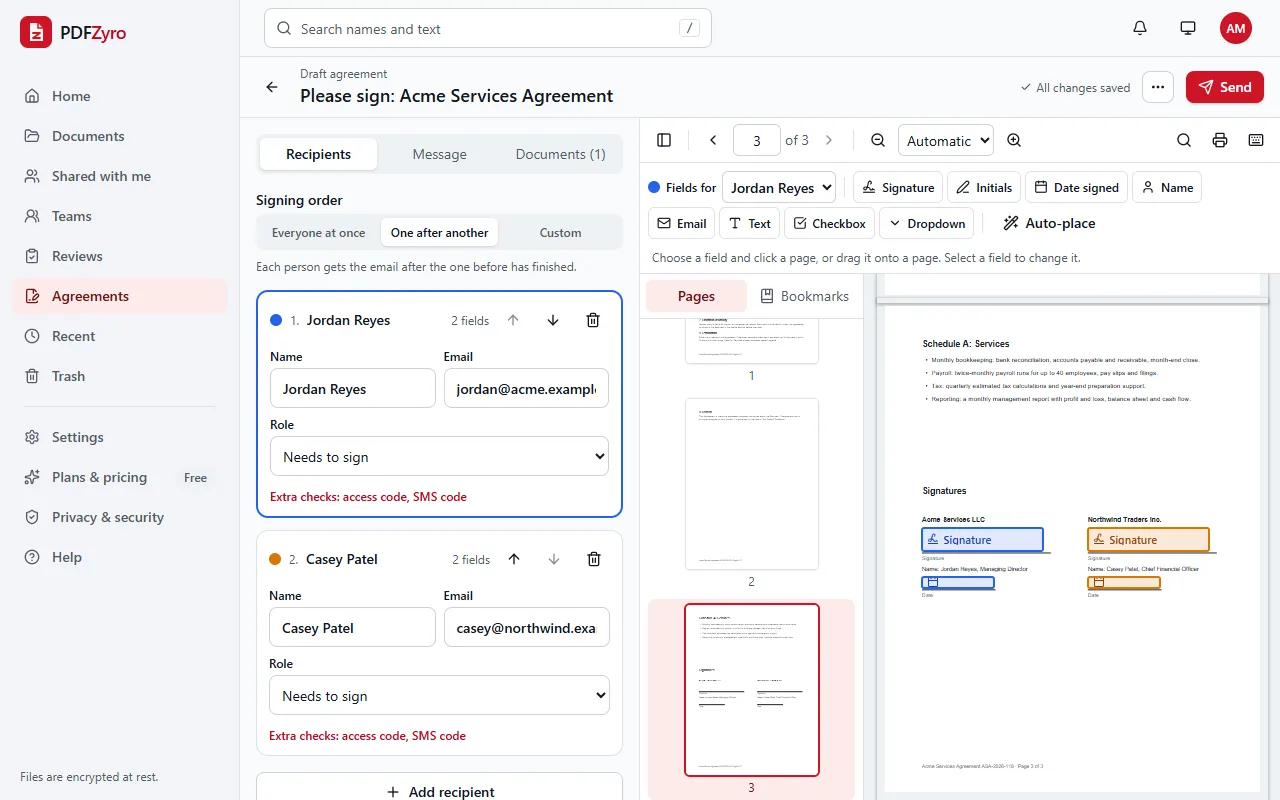
How to send a document for signature in PDFZyro
- Click Request signatures on the Home page, pick the document and click Continue.
- Add the people who need to sign, approve or receive a copy, and choose the order.
- Place the signature, initials, date and other fields for each person.
- Click Send. Each person gets an email link and doesn't need a PDFZyro account.
- Follow progress in Agreements. When everyone has signed, the sealed PDF and a certificate of completion are added to your library.
More on the e-signature page, and our plans, including the Free plan, are on the pricing page.
Where PDFZyro is weaker
PDFZyro is aimed at people who mainly need documents signed and work with PDFs. It isn't the right choice if you need any of these:
- No proposal or quote builder, no pricing tables and no payments: you bring the document, or convert it from Word.
- No integrations with CRM or other business systems, and no contract management such as clause libraries or agreement analytics.
- No tracking of how recipients read a document beyond the signing steps in the audit trail.
- No qualified electronic signatures.
- It runs in the browser and needs an internet connection; there is no offline mode.
For a closer look at switching, see PDFZyro as a DocuSign alternative or a PandaDoc alternative, each with an honest list of when the other product may suit you better, or all alternatives.
Questions and answers
Which is better, DocuSign or PandaDoc?
It depends on what you need. DocuSign is a widely used electronic signature service for sending documents to be signed and managing agreements. PandaDoc is a document platform for creating proposals, quotes and contracts and getting them signed. List the documents you send and how you create them, then try each product with one of your own documents.
Can PDFZyro replace DocuSign or PandaDoc?
For getting PDFs signed, often yes: PDFZyro sends documents for e-signature with consent, an audit trail, a sealed PDF and a certificate of completion, and includes PDF editing and conversion. It doesn't build proposals or quotes, has no pricing tables or payments, and doesn't connect to CRM systems, so it isn't a replacement for those uses.
Are e-signatures legally binding whichever service I use?
In the United States, the ESIGN Act and UETA recognize electronic signatures for most documents when the people involved agree to sign electronically, and many other countries have similar laws. What helps a signature hold up is consent, knowing who signed, a record of what happened and a file that can't be changed unnoticed. Some documents have special rules. This is general information, not legal advice.
Why doesn't this comparison list prices?
Other companies' prices and plans change often, and an out-of-date figure would mislead you. Check each provider's own website for current prices. PDFZyro's plans, including a Free plan, are on our pricing page.
Do signers need an account to sign with PDFZyro?
No. Signers open the link in their email and sign in the browser on a computer, phone or tablet. Only the sender needs a PDFZyro account.
Can I try PDFZyro alongside the tool I use now?
Yes. Create a free account with no card and send a document for signature. The Free plan includes a few signature requests each month, so you can compare the signing experience with your current tool before deciding anything.
Try PDFZyro with one of your own documents
The best comparison is a real document. Create a free account with no card, send it for signature, and see how it feels for you and your signers.
Send for signature freeDocuSign, PandaDoc and other product names are trademarks of their respective owners. PDFZyro is not affiliated with, endorsed by or sponsored by them. Names are used only to describe and compare the products.