How to convert a PDF to Excel
To convert a PDF to Excel, open a PDF to Excel converter, choose the PDF and convert it. The converter finds the tables on each page and turns them into rows and columns in an .xlsx file, with numbers you can sort, add up and chart. Then check the spreadsheet against the PDF, especially totals, before you rely on it.
This guide shows how to convert a PDF to Excel step by step, which sheet layout to choose, what converts well, how to handle scanned bank statements, and the other ways to get a PDF table into Excel.
Updated October 14, 2026 · By the PDFZyro team
How to convert a PDF to Excel in PDFZyro
- Open PDF to Excel on the Home page, or choose Convert to Excel… from the Tools menu of an open document.
- Choose the PDF from your documents, or upload it.
- Under Sheets, choose One sheet per page (the tables and the text around them) or One sheet per table (tables only).
- Choose All pages, or Some pages and type which ones, for example 2-5 if the tables are only on those pages. You can convert up to 300 pages at a time.
- For a scanned PDF, tick Recognize text in scanned pages (OCR) and choose the document's language.
- Click Convert to Excel. When the workbook is ready, the download starts by itself, and a note says how many tables were found and on how many sheets.
- Open the .xlsx in Excel, Google Sheets, Numbers or LibreOffice and check it against the PDF. The download stays available for 24 hours, and the PDF isn't changed.
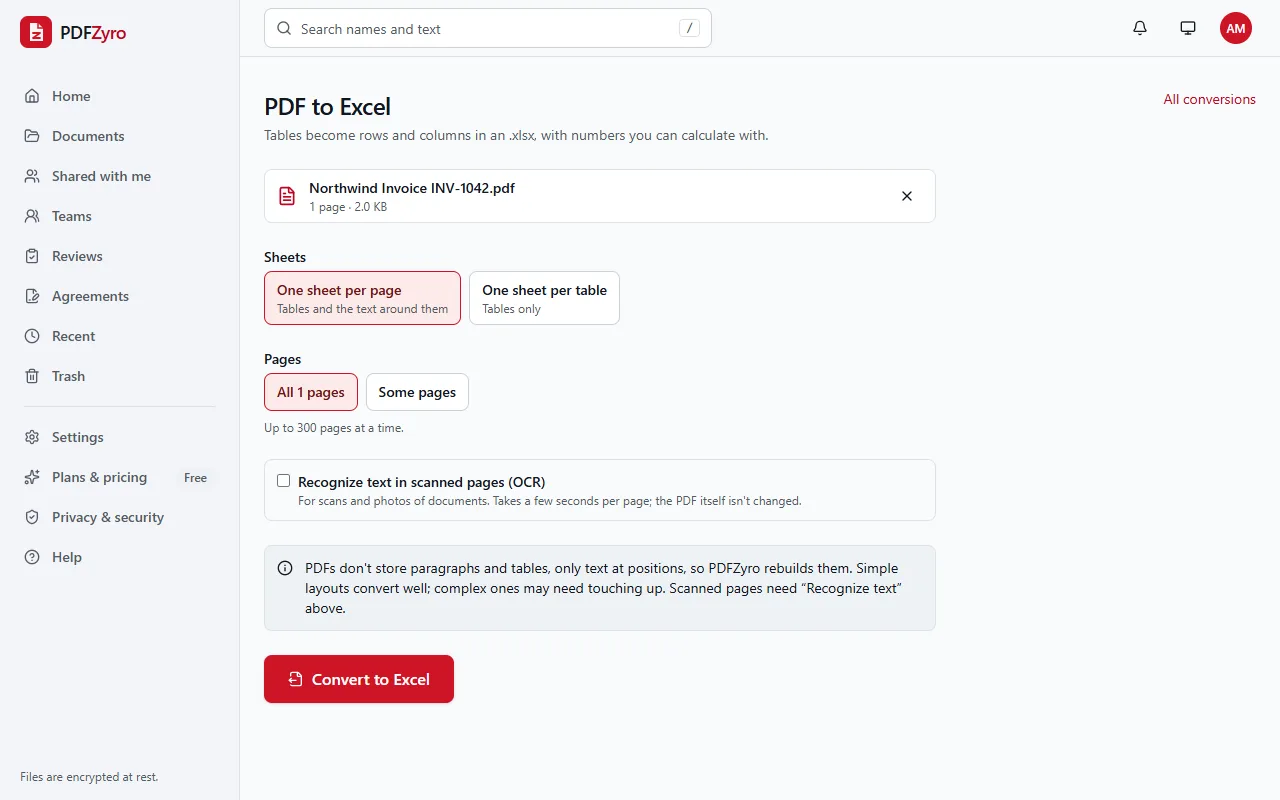
One sheet per page or one sheet per table?
- One sheet per page: each page gets its own worksheet (Page 1, Page 2...). Tables become rows and columns, and the text around them, such as an account name or a statement date, sits in the rows above and below. Choose it when you want everything on the page.
- One sheet per table: each table gets its own worksheet, named with its page, such as Table 1 (page 2), with no other text. Choose it when you only want the numbers.
- If no tables are found, the text of each page is put on its own sheet, so nothing is lost.
What converts well, and what to check
- Tables with borders convert best. Tables without borders work too, as long as their columns line up down the page.
- Numbers come through as real numbers: thousands separators, decimals, percentages, amounts with a currency sign, and amounts in brackets, which become negative numbers. Formulas such as SUM work on them straight away.
- Codes that start with a zero, such as account numbers and ZIP codes, stay as text so the zero isn't lost.
- Dates come through as text, exactly as written. Change them to Excel dates if you need to calculate with them.
- A bold header row in the PDF stays bold in the spreadsheet.
- A table that runs over several pages becomes one table per page. Copy the parts together if you want one long list.
Converting a scanned bank statement
A scanned statement or a photographed receipt is a picture, so there are no numbers to read until text recognition (OCR) has run. Tick Recognize text in scanned pages (OCR) when you convert, or run Make searchable (OCR) on the PDF first and then convert it without the box ticked.
OCR mistakes matter more in a spreadsheet than in a letter, because a misread digit changes a total. Scan at 300 DPI, keep the page straight, and check every total against the PDF. Similar characters, such as 0 and O or 1 and l, are the most common mistakes.
Other ways to convert a PDF to Excel
- Microsoft Excel (Microsoft 365 on Windows): on the Data tab, choose Get Data, then From File, then From PDF. Pick the tables you want and click Load. It works with PDFs that contain text, not with scans.
- Adobe Acrobat: the paid version can export a PDF as an Excel workbook. The free Acrobat Reader can't.
- Copy and paste: select the table in a PDF reader, copy it and paste it into Excel. It often lands in a single column; Data, then Text to Columns, splits it into columns. This suits small tables.
- Google Sheets can't open PDFs. Convert the PDF to .xlsx first, then upload the file to Google Drive and open it with Google Sheets.
Tips for accurate spreadsheets
- Convert only the pages with tables. Cover pages and terms and conditions just add sheets you'll delete.
- Check totals. Add up a column with SUM and compare it with the total in the PDF: if they match, the rows are all there.
- A password-protected PDF can't be converted. If you know the password, remove it first with Remove password on the Home page.
- Keep the PDF as the record. A converted spreadsheet is a working copy, and the PDF is what was actually sent or signed.
Questions and answers
How do I convert a PDF to Excel?
Open PDF to Excel in PDFZyro, choose the PDF, pick one sheet per page or one sheet per table, and click Convert to Excel. The .xlsx downloads with the tables as rows and columns.
Is converting a PDF to Excel free?
Yes. On the Free plan, each conversion counts as one of the daily edit, convert, compress or OCR tasks, including the text recognition you tick for scans. Pro removes the daily limit.
Can I convert a scanned bank statement to Excel?
Yes. Tick Recognize text in scanned pages (OCR) and choose the statement's language before you convert. Check the totals afterwards, as OCR can misread a digit.
Will the numbers work in Excel formulas?
Yes. Amounts with thousands separators, decimals, percentages and brackets for negatives are stored as numbers, so SUM, sorting and charts work on them. Codes that start with a zero stay as text.
Why is my spreadsheet empty or all in one column?
If it's empty, the PDF is probably a scan: convert it again with Recognize text in scanned pages (OCR) ticked. If the text isn't laid out in columns, it's read as paragraphs, so each line lands in one cell.
Can I convert Excel to PDF?
Yes. Office to PDF turns Excel, Word and PowerPoint files into PDFs, and the new PDF is added to your documents.
Related guides
- How to convert PDF to WordHow to convert a PDF to an editable Word document: step by step, choosing pages, what converts well, tips for a clean result, and other ways to do it.
- How to convert a scanned PDF to WordHow to convert a scanned PDF to an editable Word document with OCR: step-by-step instructions, tips for accurate text, what to expect, and other ways.
- How to make a scanned PDF searchableHow to make a scanned PDF searchable with OCR: why scans can't be searched, step-by-step instructions, tips for accurate text recognition, and other ways.
Related tools
- PDF to ExcelTurn PDF tables into spreadsheets you can calculate with.
- OCR PDFMake scanned PDFs searchable and editable.
- PDF to WordTurn a PDF into an editable Word document.
- Word to PDFTurn Word, Excel and PowerPoint files into PDFs.
- Split PDFSplit a PDF by page ranges, every few pages, size or bookmarks.
Every PDF tool in one place
Free plan with no time limit and no watermarks. Pro is free for 7 days, no card needed.
Convert PDF to Excel free