How to remove a password from a PDF you own
If you know a PDF's password, you can save a copy that opens without it: open the file in a PDF tool, enter the password and save an unlocked copy. It's handy for your own documents, such as bank statements, payslips or tax forms that arrive protected, when typing the password every time gets in the way of reading, editing, merging or signing them.
This guide is about removing a password you already have, from a document you're entitled to use. It doesn't cover breaking or guessing passwords: PDFZyro can't do that, and doing it to someone else's file can be against the law. If you've lost a password, see what to do at the end of this guide.
Updated October 15, 2026 · By the PDFZyro team
Two kinds of PDF password
A PDF can have a password to open it, sometimes called the user password, and a permissions password, sometimes called the owner password, which limits printing, copying or changes. A file can have one of them or both.
To remove the password to open, you need that password. To lift printing, copying or editing limits, you need the permissions password, even when the file opens without asking for anything. If you only have the password to open a file that also has limits, ask its author for the permissions password.
How to remove a PDF password in PDFZyro
You can also unlock from inside a tool: when a tool such as Edit says This PDF is password-protected, click Unlock a copy. On any open document, Remove password is also in the Tools menu.
- Create a free PDFZyro account, or sign in, and click Remove password on the Home page.
- Choose the protected PDF from your documents, or upload it.
- If PDFZyro asks for the password to show the pages, enter it. That one stays in your browser and isn't sent to our servers.
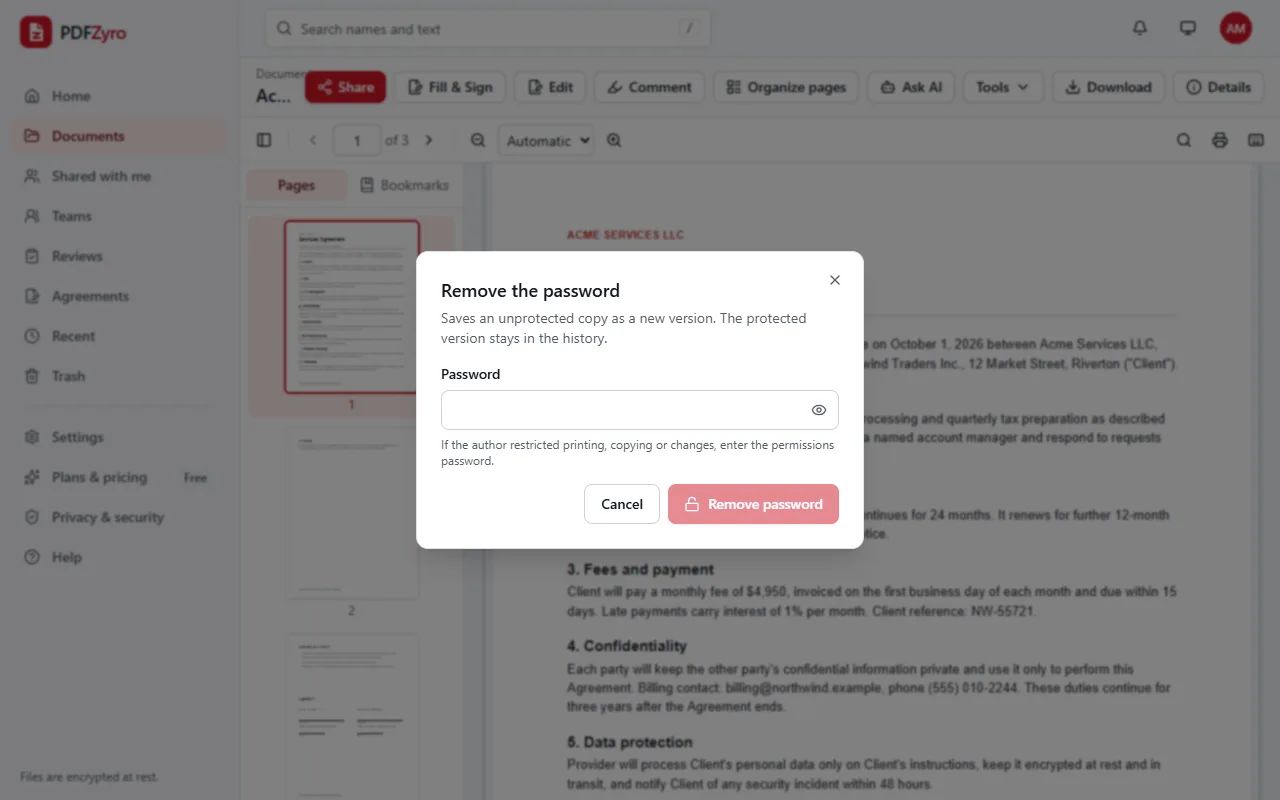
- In Remove the password, type the password. If the author limited printing, copying or changes, type the permissions password.
- Click Remove password. An unlocked copy is saved as a new version of the document, and the protected version stays in the version history.
- Click Continue, then download the unlocked PDF, or keep working on it in PDFZyro: edit, organize, merge, convert or sign it.
Is it legal to remove a PDF password?
Removing a password from your own document, or from one you were given the password for and are allowed to use, is generally fine: the password was there to protect the file on its way to you, and you're the person meant to read it. Breaking the password on a file you aren't entitled to open, or removing protection to get around copyright or an agreement, is a different matter and can be unlawful. If you're not sure you may remove a document's protection, ask whoever sent it. This is general information, not legal advice.
Remember why the password was there. An unlocked bank statement or medical letter can be read by anyone who gets hold of the file, so think before you email or upload the unlocked copy, and protect it again before sharing it.
Keep the unlocked copy safe
- In PDFZyro, every document is encrypted when stored and private to your account, whether it has a password or not.
- To share it, use a share link with its own password and an end date rather than sending the unlocked file as an attachment.
- To send it as a file, add a new password with Protect, and limits on printing and copying if you need them.
- Delete copies you no longer need, such as downloads on a shared or work computer.
- The protected version stays in the version history, so you can always go back to the file as you received it.
Other ways to remove a password you know
- Preview on a Mac: open the PDF with its password, choose File, then Export, and save a copy with encryption turned off.
- Google Chrome and other browsers: open the PDF, enter the password, print it and choose Save as PDF as the printer. The copy has no password, but it's a printed copy, so form fields and links may be lost, and it doesn't work when printing is restricted.
- Adobe Acrobat: the paid version can remove security from a PDF when you have its passwords, in the document's security settings.
What if you've lost the password?
Ask the sender. Banks, employers and government offices often explain the pattern they use, such as part of your date of birth or account number, in the email or letter that came with the file, and they can send the document again.
Check whether you need that copy at all: statements and letters can often be downloaded again from the website or app they came from. PDFZyro can't open, crack or guess lost passwords, and won't help remove protection from a document that isn't yours.
Questions and answers
How do I remove a password from a PDF for free?
Create a free PDFZyro account, click Remove password on the Home page, choose the PDF, type its password and click Remove password. Removing a password isn't counted towards the Free plan's daily tasks.
Can I remove a PDF password without knowing it?
Not with PDFZyro. It only removes a password you type in. If you've lost it, ask the person or organization that sent you the file.
Why does my PDF open but won't let me print or copy?
It has a permissions password that limits printing, copying or changes. To lift those limits, enter the permissions password in Remove password; if you don't have it, ask the document's author.
Does removing the password change the original file?
No. The unlocked copy is saved as a new version, and the protected version stays in the version history, so you can download either one.
Can I remove a PDF password on my phone?
Yes. PDFZyro works in the browser on iPhone, iPad and Android, with nothing to install.
Is it safe to upload a password-protected PDF?
In PDFZyro, your documents are encrypted when stored and private to your account, and the password you type to remove the protection is used for that task only and isn't stored.
Related guides
- How to password protect a PDFHow to password protect a PDF: the two kinds of PDF password, step-by-step instructions, how to choose a strong password, and what protection can't do.
- How to convert PDF to WordHow to convert a PDF to an editable Word document: step by step, choosing pages, what converts well, tips for a clean result, and other ways to do it.
- How to edit a PDFHow to edit a PDF: change existing text, add text, pictures and links, white out content, edit pages and scans, and other ways to edit, step by step.
Related tools
Every PDF tool in one place
Free plan with no time limit and no watermarks. Pro is free for 7 days, no card needed.
Unlock a PDF free