Delete pages from a PDF and keep the rest
Remove blank pages, duplicates or pages nobody needs from a PDF. See every page as a thumbnail, select the ones to remove, delete them in one go and save. The document without those pages is saved as a new version, and the version with every page stays in its history.
Free plan with no time limit. Pro free for 7 days, no card needed.
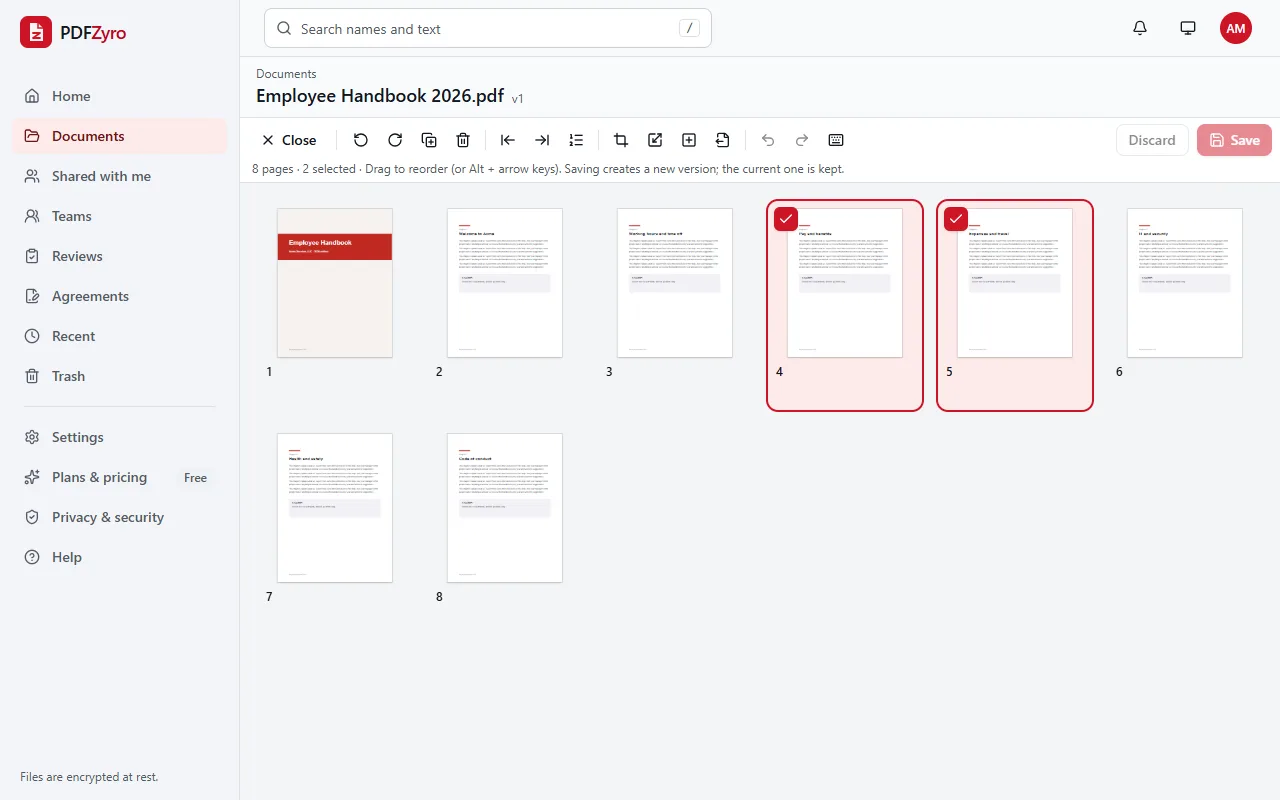
How to delete pages from a PDF
Open the PDF
Open Organize pages and choose a document from your library, or upload one. If the document is already open, click Organize pages.
Select and delete
Click a page, Shift-click a run of pages or Ctrl-click pages from anywhere, then click Delete or press the Delete key.
Save
Click Save. The document without those pages is saved as a new version, and the earlier version, with every page, stays in the history.
Want the details? Read our guide: How to delete pages from a PDF
A PDF page remover that keeps you safe
One page or many at once
Remove a single page, a run of pages or pages from all over the document in one go, by mouse, touch or keyboard.
Undo before you save
Deleted the wrong page? Click Undo or press Ctrl+Z. Nothing changes in the file until you click Save, and Discard drops every change.
Get a page back later
Saving never changes the original: the version with every page stays in the document's history, where you can restore it or copy pages out of it.
Bookmarks and form fields tidied
Bookmarks that pointed to a deleted page are removed, and so are form fields on deleted pages, so nothing points to a page that's gone.
Often a smaller file
Pictures and fonts that only the deleted pages used are left out of the new version, so the PDF usually gets smaller.
On phones and tablets
Tap the box in the corner of each page to remove, tap Delete, then Save. Nothing to install.
Private by design
Encrypted and private
Every file is encrypted before it's stored, and only you and the people you share with can open it.
Your original stays safe
Every change is saved as a new version. The original is never changed, and you can restore it at any time.
No watermarks
Files you save never get a watermark, on any plan, including the free one.
Works in your browser
Nothing to install. Use it on Windows, Mac, Linux, Chromebooks, iPhone, iPad and Android.
Questions and answers
How do I delete a page in a PDF?
Open the PDF with Organize pages in PDFZyro, click the page, click Delete (or press the Delete key) and click Save. The document without that page is saved as a new version.
How do I remove several pages from a PDF at once?
Select them all first: Shift-click to select a run of pages, or Ctrl-click (⌘-click on a Mac) to pick pages from anywhere. Then click Delete once and save.
Should I delete pages or extract the ones I need?
If you want to keep only a few pages of a long PDF, Extract pages is quicker: type the pages to keep and they're copied into a new document. Deleting is easier when you want to remove a few pages and keep the rest.
Are deleted pages gone for good?
Not from the document's history: earlier versions still contain them, which is how you can get a page back. If the pages must not be shared, extract the pages you want to share into a separate document and share that one.
Can I delete every page of a PDF?
No. A PDF needs at least one page. To get rid of the whole document, delete it from your library instead.
Is Delete PDF pages free?
Yes. Delete PDF pages isn't counted towards the Free plan's daily tasks, so you can use it as much as you like with files up to 50 MB. Pro adds unlimited edit, convert, compress and OCR tasks and more storage, and is free to try for 7 days.
Related tools
- Organize PDFReorder, delete, insert, rotate and resize pages.
- Extract PDF pagesCopy the pages you choose into one new PDF.
- Split PDFSplit a PDF by page ranges, every few pages, size or bookmarks.
- Rotate PDFTurn sideways or upside-down pages and save them that way.
Switching from another app? Adobe Acrobat alternative · Foxit PDF Editor alternative · Smallpdf alternative · iLovePDF alternative
Remove the pages nobody needs
Create a free account in under a minute. No card needed, and no watermarks on anything you save.
Delete PDF pages free