How to sign a Word document electronically
To sign a Word document electronically, the most reliable way is to save it as a PDF, open the PDF in a signing tool, create your signature by typing, drawing or uploading it, place it on the signature line and download the signed copy. Word has its own options too: a picture of your handwritten signature works in any version, and Word for Windows has a signature line for certificate-based digital signatures.
This guide shows each way step by step, how to get a Word document signed by other people, and which way suits a letter, a form or a contract.
Updated October 15, 2026 · By the PDFZyro team
Three ways to sign a Word document
- Insert a picture of your signature in Word: quick, and fine for letters, but it doesn't record who signed or stop later changes.
- Use Word's signature line (Word for Windows): signs the .docx with a digital ID, a certificate you need to have.
- Save the document as a PDF and sign it, or send it for e-signature: works on any computer or phone, seals the signed file and, when others sign, keeps an audit trail.
Add a picture of your signature in Word
In Word for Windows, you can save the signature picture and your typed name as a Quick Part (Insert, then Quick Parts) to reuse them. Keep in mind that a pasted picture is easy to copy, the document can still be changed after it's signed, and nothing records who added the signature or when.
- Sign your name on a sheet of white paper, then photograph or scan it and crop the picture close to the signature. Save it as a PNG or JPG.
- In Word, click where the signature goes, choose Insert, then Pictures, and pick the image.
- Resize the picture by dragging a corner. To move it freely onto the line, set Wrap Text to In Front of Text.
- Type your name and the date under it if the document asks for them, then save the document.
Use Word's signature line (Word for Windows)
Signing this way needs a digital ID (a certificate); if you don't have one, Word tells you. Once signed, the document is marked as final, and editing it removes the signature. The signature belongs to the .docx file and is checked in Word: it doesn't carry over if the document is later saved as a PDF. Signature lines aren't available in Word for Mac or Word for the web.
- Click where the line goes, then choose Insert, then Signature Line (in the Text group), then Microsoft Office Signature Line.
- Type the signer's name, title and email address, and click OK.
- To sign, double-click the signature line (or right-click it and choose Sign), type your name or select a picture of your signature, and click Sign.
Sign a Word document as a PDF in PDFZyro
PDFZyro seals the signed PDF with a digital certificate, so any later change can be detected, and keeps it as a new version of the document. Your Word file isn't changed. Send the signed PDF rather than the Word file: converting it back to Word would lose the seal.
- Create a free PDFZyro account and click Office to PDF on the Home page.
- Click Choose files and pick the Word document (.docx or .doc), then click Convert to PDF.
- When Your PDF is ready appears, click Open to view the PDF.
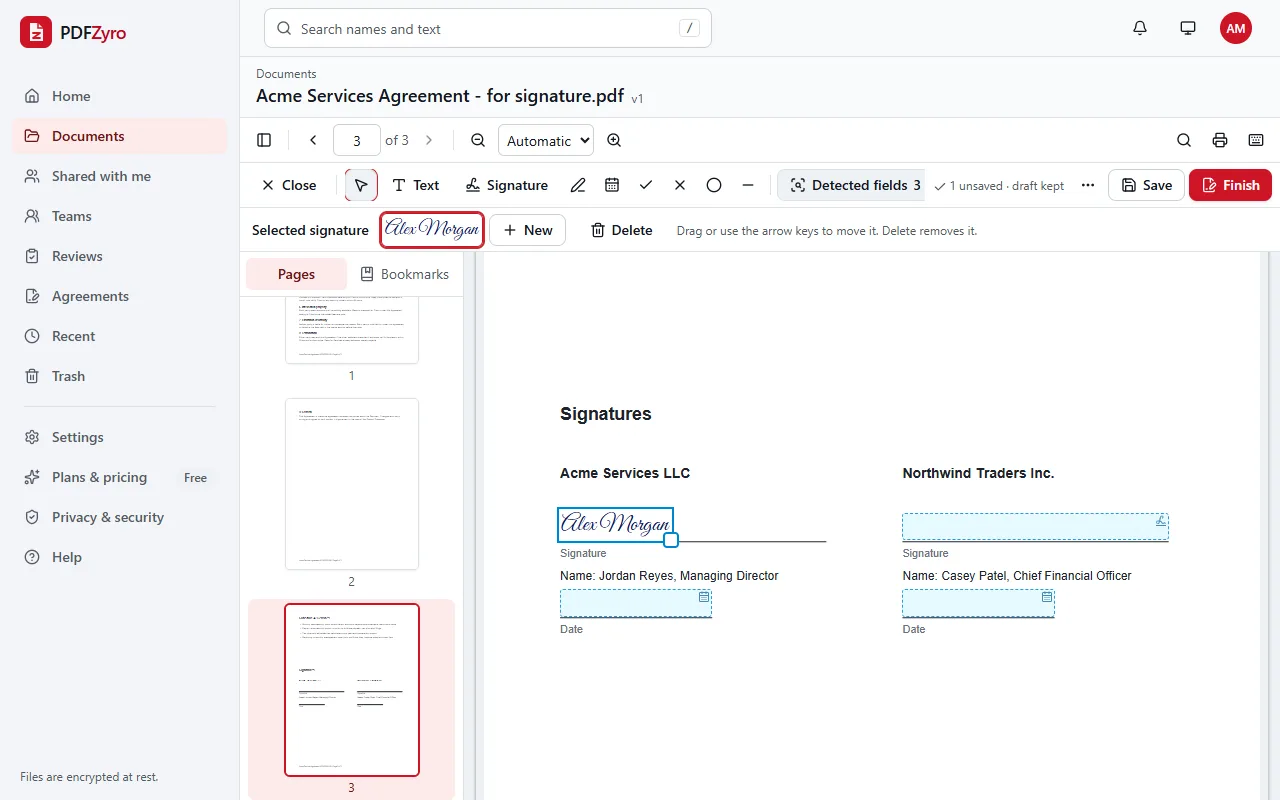
- Click Fill & Sign, choose Signature (or press S) and click the signature line. The first time, type your name and pick a style, draw your signature with a mouse, trackpad or finger, or upload a picture of it. It's saved to your account for next time.
- Add the Date, Initials or any other text the document asks for.
- Click Finish, read and tick the consent to sign electronically, then click Sign and download.
Get someone else to sign a Word document
- Convert the Word document to PDF with Office to PDF, as above. Signature requests work with PDFs.
- Open the PDF and choose Request signatures… from its Tools menu, or click Request signatures on the Home page and pick it. Click Continue.
- Add each person's name and email address, choose their role, such as Needs to sign or Receives a copy, and the signing order.
- Place a signature field and any date, initials or text fields for each signer. Auto-place finds signature lines, dates and blanks for you.
- Click Send, check the summary and click Send now. Each person gets an email link and signs in their browser, without creating an account.
- Follow progress in Agreements. When everyone has signed, the sealed PDF and a certificate of completion are added to your documents.
Which way should you use?
In the United States, the ESIGN Act and UETA give electronic signatures the same legal effect as handwritten ones for most documents, when the people involved agree to sign electronically. Some documents, such as wills and certain family or court documents, have special rules. This guide is general information, not legal advice.
- A letter or an informal note: a picture of your signature in Word is usually enough.
- An organization that already issues digital IDs to its staff: Word's signature line fits in with that.
- Contracts, agreements and forms someone else must sign: send a PDF for e-signature, so you have each signer's consent, an audit trail and a sealed file.
Before you sign: tidy the Word document
- Accept or reject tracked changes and delete comments, so they don't end up in the PDF.
- Make sure it's the final version. If anything changes after signing, sign the new version again.
- Leave a clear signature line with a label such as Signature or Date next to it, so Auto-place can find it.
- Check the PDF before signing. If the document uses an unusual font, a similar one may be used, which can move line breaks.
Questions and answers
How do I electronically sign a Word document for free?
Create a free PDFZyro account, convert the document with Office to PDF, open the PDF and click Fill & Sign, place your signature and click Finish to sign and download. On the Free plan, the conversion counts as one of the daily edit, convert, compress or OCR tasks, signing isn't counted, and no watermark is added.
Can I sign a Word document without printing it?
Yes. Insert a picture of your signature in Word, use Word's signature line in Word for Windows, or save the document as a PDF and sign it electronically in your browser.
How do I sign a Word document on a Mac?
Word for Mac doesn't have signature lines. Insert a picture of your signature with Insert, then Pictures, or save the document as a PDF (File, then Save As, then PDF) and sign it in PDFZyro in Safari or Chrome, drawing your signature with the trackpad.
Can I send a Word document for someone else to sign?
Yes. Convert it to PDF with Office to PDF, then click Request signatures, add the person's name and email and place their signature field. They sign in their browser without an account.
Is a signature pasted into a Word document legally binding?
It can be: laws such as ESIGN and UETA in the US don't require a signature to be handwritten. What matters if it's ever disputed is showing who signed and that they agreed, which a pasted picture doesn't record. An e-signature with consent, an audit trail and a sealed PDF gives you that evidence. This is general information, not legal advice.
Will my document look the same as a PDF?
Usually, yes: Office to PDF keeps the layout, fonts and pictures. If the document uses a font the converter doesn't have, a similar one is used, so check the PDF before you sign it.
Terms in this guide: Digital signature · Digital ID (signing certificate) · Wet signature · Electronic signature (e-signature) · Audit trail
Related guides
- How to convert Word to PDFHow to convert a Word document to PDF: in Word itself or online without Word, several files at once, Excel and PowerPoint too, and tips for a clean PDF.
- How to sign a PDF for freeHow to sign a PDF for free: esign it online or on a Mac, insert your signature and the date, get others to sign, and what makes an electronic signature valid.
- How to send a PDF for signatureHow to send a PDF for signature: add signers and the signing order, place fields, send reminders, and get a sealed PDF with an audit trail and certificate.
Related tools
- Sign PDFAdd your signature, initials and the date to any PDF.
- Word to PDFTurn Word, Excel and PowerPoint files into PDFs.
- Request signaturesSend documents for e-signature with a full audit trail.
- Fill PDFFill in PDF forms, even flat ones without fields.
- PDF to WordTurn a PDF into an editable Word document.
Every PDF tool in one place
Free plan with no time limit and no watermarks. Pro is free for 7 days, no card needed.
Sign a document free