Skip to content

PDF tools for lawyers, paralegals and small law firms

Legal work runs on PDFs: productions, exhibits, contracts that change with every round of comments, and agreements whose signatures you may have to defend later. PDFZyro puts the tools for that work in one browser app, so a paralegal can number a production, redact it, check the other side's redline and send the engagement letter without switching programs.

Every change is saved as a new version, so the original file is never altered and you can always go back to it.

Free plan with no time limit. Pro free for 7 days, no card needed.

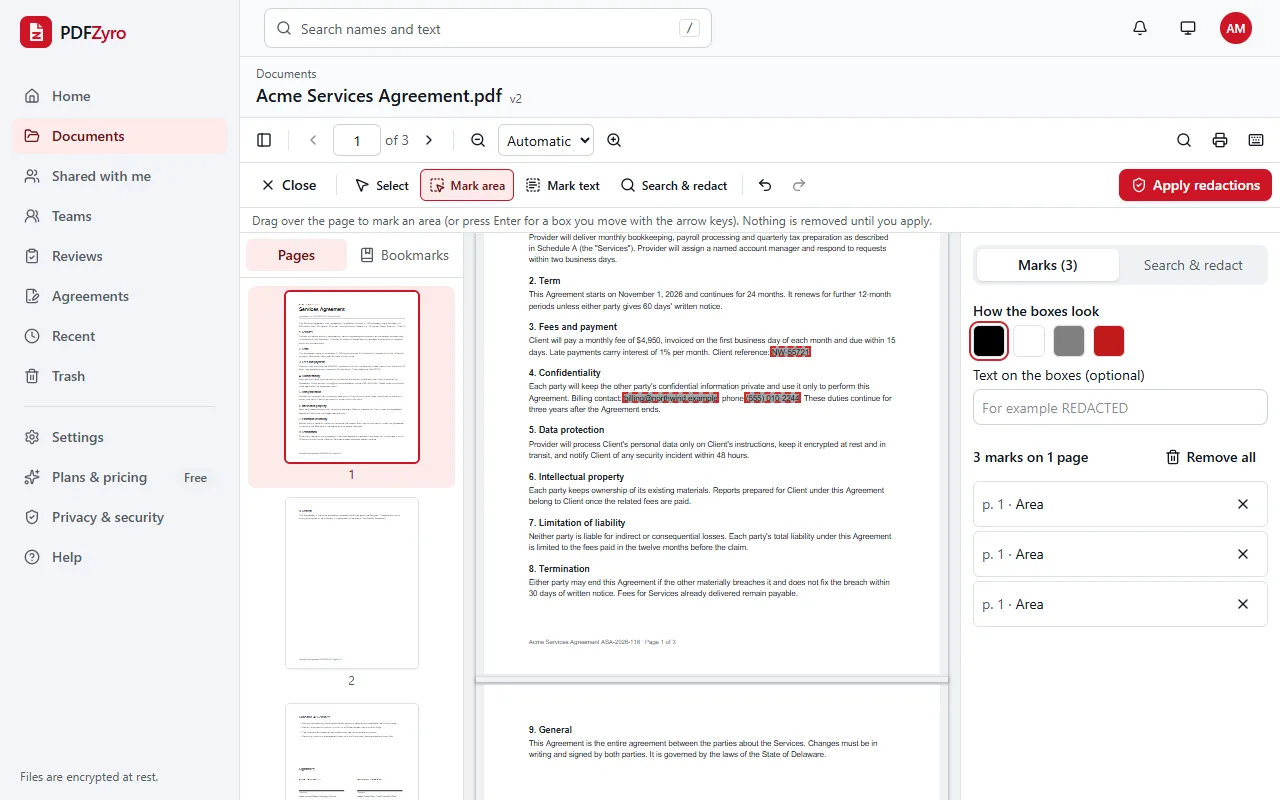
Redact mode in PDFZyro: a client reference, an email address and a phone number in a services agreement are marked for redaction, with the list of marks and the box colour on the right and an Apply redactions button.
Mark what to hide; nothing is removed until you apply.

What legal teams use PDFZyro for

  • Number productions with Bates numbers

    Stamp a prefix and a running number on every page of one document or a whole set, continuing from one file to the next, in the corner you choose. Each numbered document is saved as a new version, so the unnumbered originals stay in your library.

  • Redact privileged and personal information for real

    Mark text by hand or search for patterns such as Social Security numbers, emails and phone numbers, review the marks, then apply. The content under each box is removed from a new copy of the file, not just covered, and you can strip hidden data such as metadata and comments too.

  • Send engagement letters and settlements for e-signature

    Signers agree to sign electronically first, sign from an email link without an account, and can be asked for an access code. You get a tamper-evident audit trail, a sealed final PDF and a certificate of completion showing who signed, when and how they were checked.

  • Make scans searchable and keep PDF/A copies

    Run OCR on scanned exhibits and correspondence so their text can be searched and copied, then save a final copy as PDF/A, the archival format many courts and records offices ask for. The PDF/A copy sits next to your working file as a new version.

What PDFZyro doesn't do

  • No qualified electronic signatures (QES). PDFZyro's e-signatures are electronic signatures with an audit trail; a document that legally requires a QES needs a qualified trust service provider.
  • No court e-filing. Prepare and number your PDFs here, then file them through the court's own system.
  • PDF/A copies aren't validated yet. If a court requires a validated file, check it with the validator it names.
  • No integrations with practice-management or document-management software.

Questions and answers

Are PDFZyro e-signatures valid for legal documents?

In the United States, the ESIGN Act and UETA recognize electronic signatures for most documents, and many other countries have similar laws. Some documents, such as wills in many places, still need ink or witnesses. PDFZyro records each signer's consent, an audit trail and a sealed PDF. This is general information, not legal advice.

Does redaction remove the text or just cover it?

It removes it. When you apply redactions, the text and the parts of pictures under each mark are deleted in a new copy of the document, so they can't be selected, searched or recovered. The unredacted original stays in your library.

Can Bates numbers continue across many documents?

Yes. Choose the documents in the order they should be numbered, and the numbering runs on from the last page of one file to the first page of the next, with your prefix and number of digits.

Who can see client documents?

Only you and the people you share them with. Files are encrypted before they're stored, team folders have roles that limit who can view or edit, and share links can have a password, an end date and downloading turned off.

Does opposing counsel need an account to sign?

No. Signers open their email link and sign in the browser on any device. Only the sender needs a PDFZyro account.

PDFZyro for other work

Try it on your own documents

Create a free account in under a minute. No card needed, and no watermarks on anything you save. Compare plans.

Start free with redaction