Skip to content

Get real estate paperwork signed from anywhere

Offers, counteroffers, disclosures and listing agreements move fast, and buyers and sellers are rarely at a desk when they need to sign. PDFZyro lets you fill in the forms you already use, send them for e-signature from your phone or laptop, and keep every signed copy in one place.

Clients don't need an account or an app: they sign from an email link in their phone's browser.

Free plan with no time limit. Pro free for 7 days, no card needed.

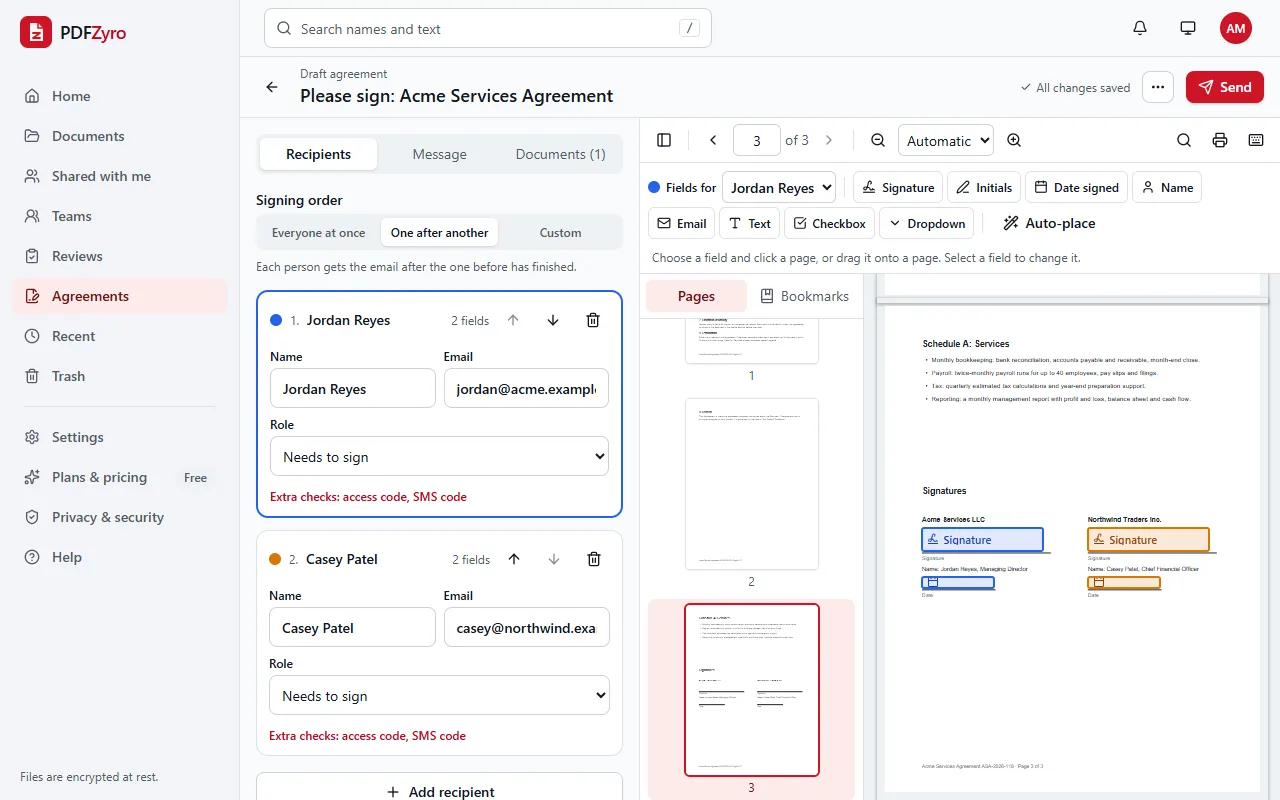
Setting up a signature request in PDFZyro: two signers, Jordan Reyes and Casey Patel, signing one after another, with signature and date fields placed on the agreement's signature page.
Request signatures: add signers, set the order and place their fields.

What agents use PDFZyro for

What PDFZyro doesn't do

  • No forms library: PDFZyro doesn't supply state or association forms. Upload the forms you're entitled to use.
  • No MLS, CRM or transaction-management integrations.
  • No online notarization. Documents that must be notarized still need a notary.

Questions and answers

Do buyers and sellers need an account to sign?

No. They open the link in their email and sign in the browser on any phone, tablet or computer. Only you need a PDFZyro account.

Are e-signatures accepted for real estate documents?

In the United States, the ESIGN Act and UETA recognize electronic signatures for most real estate contracts, but some documents, such as deeds to be recorded, may need ink or notarization depending on the state. Check your local rules; this is general information, not legal advice.

Can I reuse the same listing paperwork?

Yes. Save documents you send often as templates with the fields already placed, on the Pro and Business plans, and start each new request from the template.

Can I change a request after sending it?

You can correct a recipient's details, send reminders, or void the request and send a new one. Once a document is signed it's sealed, so any later change can be detected.

Is my clients' information secure?

Documents are encrypted before they're stored, and each signer gets a personal link. You can add an access code, or a text-message code on the Business plan, for extra checks. Every step is recorded in the audit trail.

PDFZyro for other work

Try it on your own documents

Create a free account in under a minute. No card needed, and no watermarks on anything you save. Compare plans.

Send for signature free